Official Ruby SDK for reliable delivery
Send email in Ruby
Send email in Ruby from scripts, jobs, and web apps with Sidemail's clean email API and official gem. Sidemail takes care of deliverability, authentication, and infrastructure so your Ruby code focuses on application logic while the platform delivers emails reliably.
Get startedRead API docsrequire "sidemail"
sm = Sidemail.new
sm.send_email(
toAddress: "[email protected]",
fromAddress: "[email protected]",
fromName: "Your App",
templateName: "Welcome",
templateProps: {
firstName: user.name,
},
)Quickstart: Send email in Ruby
Follow these three steps to get your first Sidemail powered email out of a Ruby script or app.
Install the Sidemail Ruby SDK
Add Sidemail to your environment with RubyGems:
gem install sidemailInitialize the client
Create a Sidemail client and let it read SIDEMAIL_API_KEY from your environment, or pass the API key explicitly.
require "sidemail"

# Reads SIDEMAIL_API_KEY from your environment automatically
sm = Sidemail.new
# or: sm = Sidemail.new(api_key: ENV["SIDEMAIL_API_KEY"])Send your first email
Call sm.send_email with recipient, sender, and either a Sidemail template or raw content. Sidemail takes care of the authentication, rendering, and delivery.
# Example: send a welcome email template
sm.send_email(
	toAddress: "[email protected]",
	fromAddress: "[email protected]",
	fromName: "Your App",
	templateName: "Welcome", # template stored in Sidemail
	templateProps: { firstName: "Alice" }, # dynamic data for template variables
)
Key features & perks
Why Sidemail for Ruby emails
Fast Ruby email setup
Install the gem, setSIDEMAIL_API_KEY, and call one method. Sidemail keeps the integration close to normal Ruby conventions, so you can get from zero to sent email in under 30 minutes.Reliable email delivery
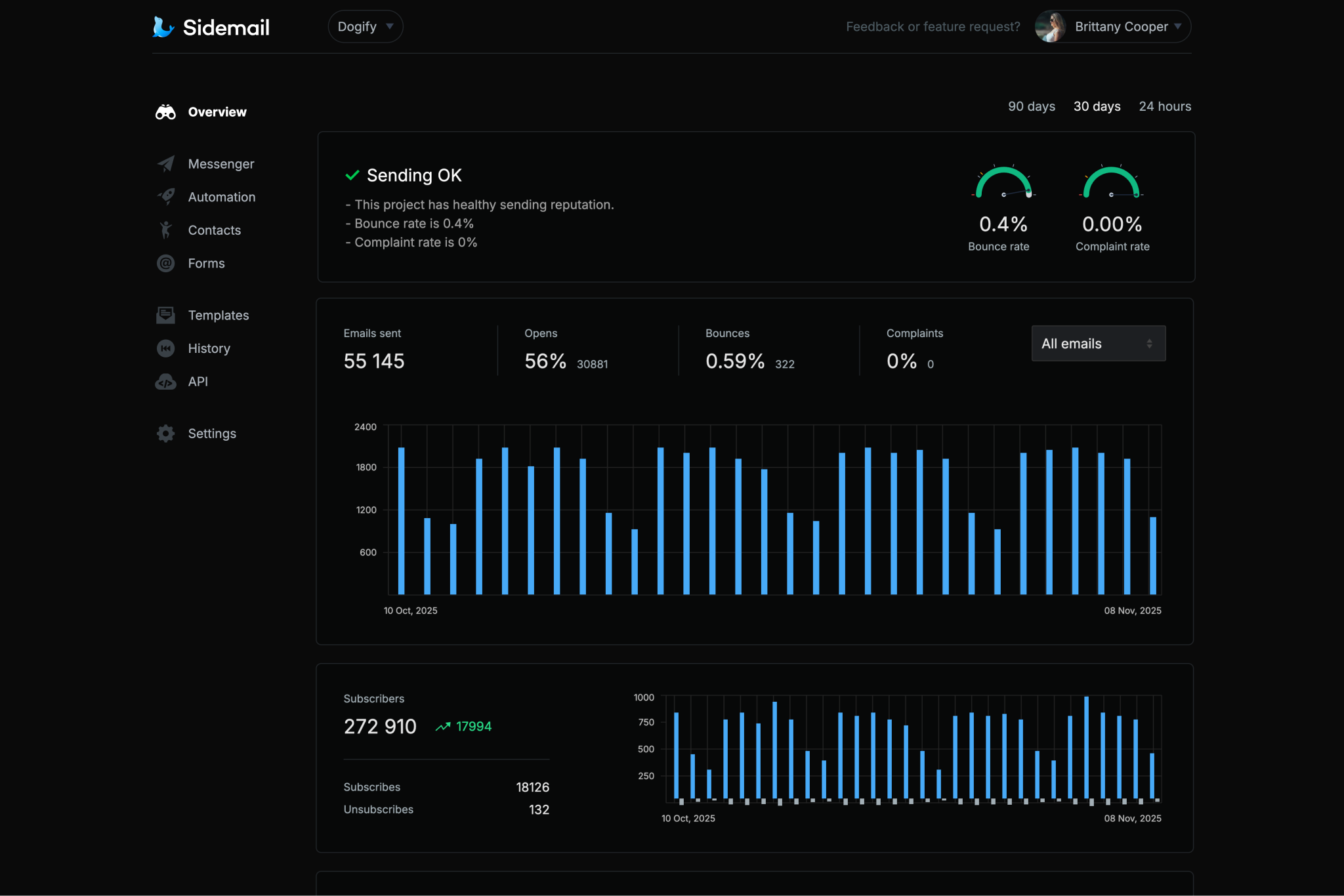
Sidemail's rock‑solid infrastructure and careful sender vetting process ensure your emails reliably reach inboxes. You get production ready deliverability without having to tune servers or IPs yourself.Custom sending domain with DKIM & SPF
Send from your own domain and keep authentication aligned with modern deliverability requirements. Sidemail walks you through domain verification, and automatically sets up DKIM and SPF for you (+ optional DMARC). This proves to mailbox providers that your Ruby app is an authorized sender which improves reputation and inbox placement.All‑in‑one email platform
Use one platform for transactional email, newsletters, automations, and contact data. Your Ruby app only integrates with one API while templates, contact lists, and analytics are managed through the same intuitiveUI.Premade email templates & no‑code email editor
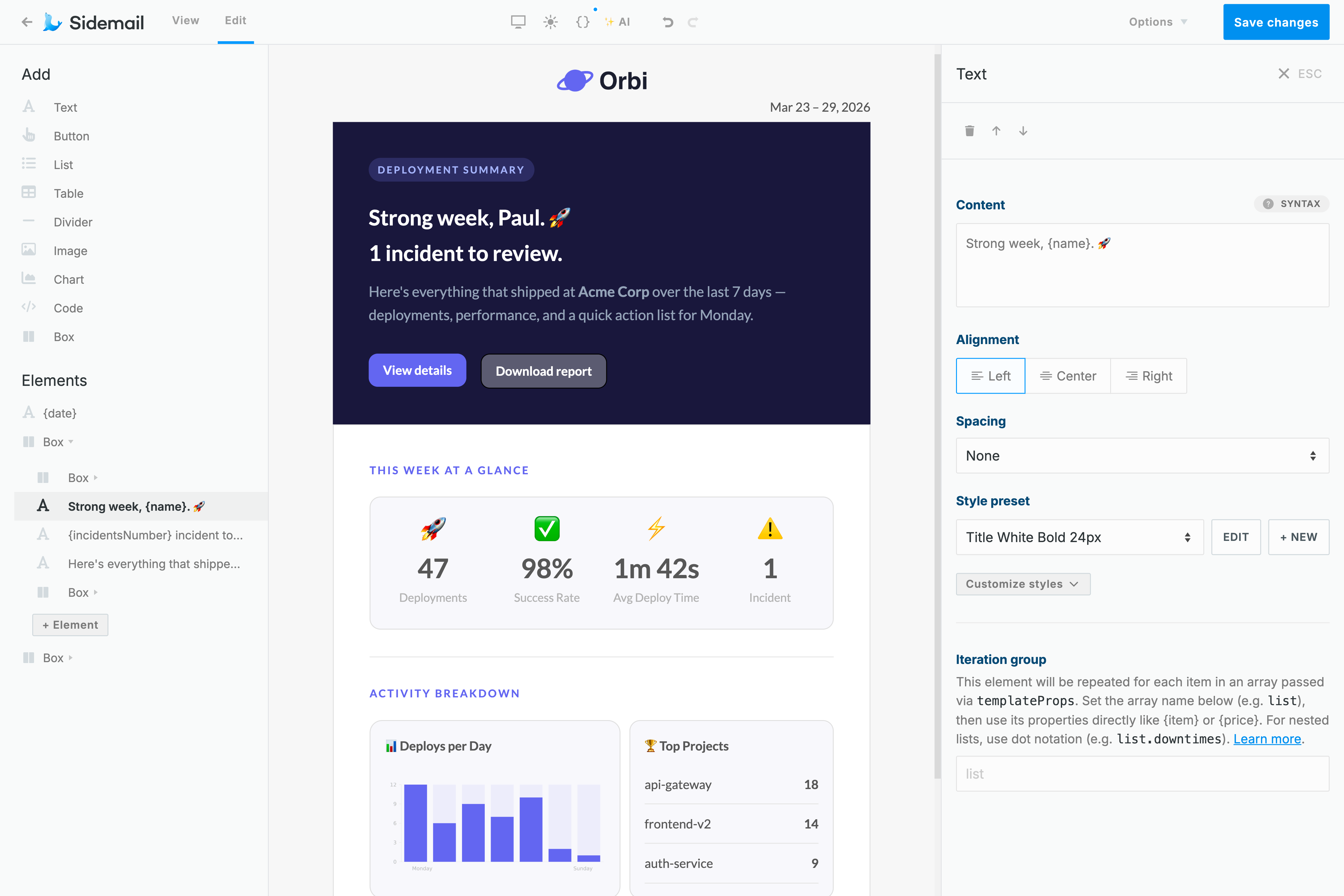
Sidemail comes with a library of ready‑to‑use, battle‑tested email templates that look great across every inbox. If you need something custom, Sidemail's visual email editor lets you build responsive email templates without hand coding HTML.Developer centric tooling
clear documentation, copy paste snippets for Ruby and other languages, and detailed API request logs plus unlimited searchable email history with previews. You can inspect each email timeline, status, and payload which makes debugging from Ruby scripts or Rails controllers straightforward.
Ruby transactional email examples
With Sidemail, you can send any transactional emails such as verification, receipts, password resets, and scheduled onboarding or reports, all through the same send_email call.
# Ruby: Send a password reset email with a Sidemail template
sm.send_email(
	toAddress: "[email protected]",
	fromAddress: "[email protected]",
	fromName: "Your App",
	templateName: "Password Reset",
	templateProps: {
		actionUrl: "https://yourapp.com/reset/#{token}",
	},
)
Password reset email
Send a secure reset link right after a user requests a password change.
- Use a clear action button and expire the reset link after a short window for security.
- Sidemail includes premade password reset templates, so you can launch quickly and keep the email design consistent.
# Ruby: Send a payment receipt email template
sm.send_email(
	toAddress: "[email protected]",
	fromAddress: "[email protected]",
	fromName: "Your App",
	templateName: "Payment Receipt",
	templateProps: {
		userName: user.name,
		amount: "$19.99",
		date: Date.today.iso8601,
	},
)
Receipt or notification email
Send a receipt, invoice, or similar post purchase message as soon as an important event finishes.
- Include key details like amount, date, and context so the message remains useful later.
- Use
templatePropsto inject dynamic values while keeping the template design stable.
# Ruby: Schedule a welcome email for 1 hour from now
require "date"

scheduled_at = (Time.now + 60 * 60).utc.iso8601

sm.send_email(
	toAddress: "[email protected]",
	fromAddress: "[email protected]",
	fromName: "Your App",
	templateName: "Welcome",
	templateProps: { firstName: "Alex" },
	scheduledAt: scheduled_at,
)
Welcome email with scheduled delivery
Schedule a welcome email for later, for example an hour after sign up.
- Set
scheduledAtto a future ISO timestamp to control when the message is sent. - This works well for onboarding flows where timing matters and you do not want every message to fire immediately.
# Ruby: Send a weekly report email with markdown
markdown_content = File.read("templates/emails/weekly-report.md")

sm.send_email(
	toAddress: "[email protected]",
	markdown: markdown_content,
	templateProps: {
		firstName: "Alex",
		newUsers: "128",
		totalRevenue: "$4,320",
		topFeature: "Dashboard",
	},
)
---
subject: "Your weekly report is ready"
fromAddress: "[email protected]"
fromName: "Your App"
---
Hi {firstName}, here is your weekly summary.
## Key metrics
- **New users:** {newUsers}
- **Revenue:** {totalRevenue}
- **Top feature:** {topFeature}
[$btn View full report](https://yourapp.com/reports/latest)Weekly report email sent with Markdown
Sidemail lets you write email content in Markdown, then turns it into responsive HTML that matches your project's email design. That means faster authoring in Ruby and less HTML to maintain.
- Keep your email body in a
.mdfile. Headings, lists, and bold text render automatically. - Subject and sender live in the markdown frontmatter.
- Great fit for recurring emails like reports and digests where the structure stays the same but the data changes every time.
Deliverability best practices
SPF, DKIM, and DMARC for transactional email
SPF and DKIM help mailbox providers verify that your transactional emails are genuinely sent from your domain. DMARC adds policy and alignment on top of that, which matters for sender reputation and inbox placement.
Sidemail walks you through domain verification and the DNS records needed for production sending, so your Ruby app sends authenticated, best‑practice‑compliant emails from day one.
The simplest way to build emails
No-code email editor & premade email templates
Build responsive email templates with Sidemail's visual editor. Add your logo, adjust brand colors, and create production ready emails without wrestling with HTML tables or client quirks.
If you need to move faster, import a premade template for welcome emails, password resets, receipts, and more. Every template is designed to render well across inboxes, so your Ruby app can focus on sending logic instead of email layout edge cases.
Learn moreDeveloper friendly formatting
Markdown support for Ruby emails
Writing HTML emails by hand is slow and fragile, especially when the content itself is simple.
Sidemail lets you keep the email body in Markdown, define the subject and sender in frontmatter, and convert everything into a responsive HTML email automatically. Headings, lists, links, buttons, and variables all work out of the box.
It is a practical fit for Ruby transactional emails – clean authoring, reusable files, and no HTML debugging loop.
Learn more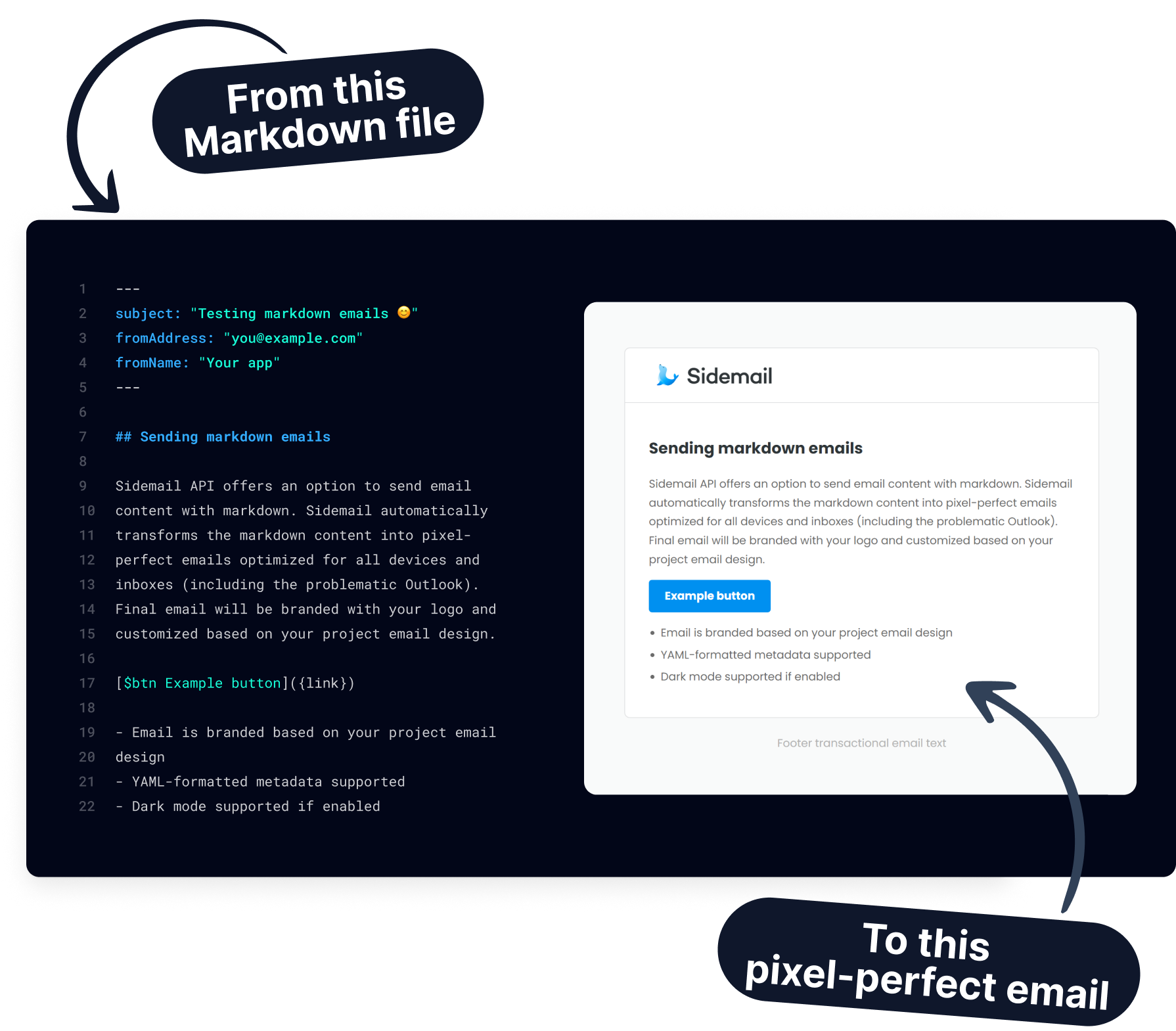
Get started today
Ready to send transactional emails from Ruby? Sidemail gives you a native Ruby library, email API, tested templates, no‑code editor, and more in one email platform. Install the gem, set your API key, and send your first email in minutes.
Start free trialFAQs
What is the easiest way to send email in Ruby?
The simplest approach is to use Sidemail's Ruby SDK. Install the gem (gem install sidemail), initialize the client with your API key, and call sm.send_email(). Sidemail handles the API request, authentication, and deliverability layer for you.
Does Sidemail work with Ruby on Rails?
Yes. You can use the same Ruby SDK in Rails controllers, service objects, and background jobs. If you want a Rails specific walkthrough, Sidemail also has a dedicated Ruby on Rails guide.
How do templates work when sending email from Ruby?
Create or import transactional templates in the Sidemail dashboard, then reference them from Ruby by setting templateName and providing a templateProps hash. Sidemail merges your data into the template, renders responsive HTML, and delivers it.
Can I send Markdown emails from Ruby?
Yes. Read a markdown file with File.read(), pass it as the markdown parameter, and use markdown frontmatter for subject and sender. Sidemail converts the content into responsive HTML and maps variables from templateProps into the message.
Can I schedule an email to send later from Ruby?
Yes. Add a future ISO 8601 timestamp to the scheduledAt field in your sm.send_email() call. Sidemail queues the email and delivers it at the time you specify, which is useful for onboarding sequences, reminders, and delayed follow ups.
Can I attach files when sending email in Ruby?
Yes. Use the Sidemail.file_to_attachment() helper to build the attachment object, then pass it in the attachments array. For example, read a PDF with File.read("invoice.pdf"), convert it with the helper, and include it in the send request.
How should I handle errors from the Ruby SDK?
Wrap your send call in a begin / rescue block and catch Sidemail::Error. The exception includes the message and can include HTTP status and error code details, which makes it straightforward to log failures and debug integration issues.