Simple setup & reliable delivery
Send email in Django
Add email sending to your Django application in minutes with Sidemail's official Python SDK and developer‑friendly API. Sidemail handles deliverability, SPF/DKIM/DMARC, templates, and infrastructure so your Django views can send reliable, production‑ready emails with minimal code.
Get startedRead API docsfrom django.http import JsonResponse
from .services import sidemail
def register(request):
# ... create user
sidemail.send_email(
to_address=user.email,
from_address="[email protected]",
from_name="Your App",
template_name="Welcome",
template_props={"firstName": user.first_name},
)
return JsonResponse({"status": "registered"})Quickstart: Send email in Django
Start sending emails from your Django app in three steps:
Install the Sidemail Python SDK
Add Sidemail to your Django project via pip:
pip install sidemailCreate a shared Sidemail service
Create a services.py file in your Django app and initialize the Sidemail client. The SDK reads SIDEMAIL_API_KEY from your environment automatically.
# myapp/services.py
from sidemail import Sidemail
sidemail = Sidemail()Send email from a view
Import the Sidemail client and call send_email. Pass the recipient, sender, and template or content. That's it.
from django.http import JsonResponse
from .services import sidemail

def register(request):
    # ... create user

    sidemail.send_email(
        to_address=user.email,
        from_address="[email protected]",
        from_name="Your App",
        template_name="Welcome",
        template_props={"firstName": user.first_name},
    )

return JsonResponse({"status": "registered"})Key features & perks
Why Sidemail for Django emails
Quick Django email integration
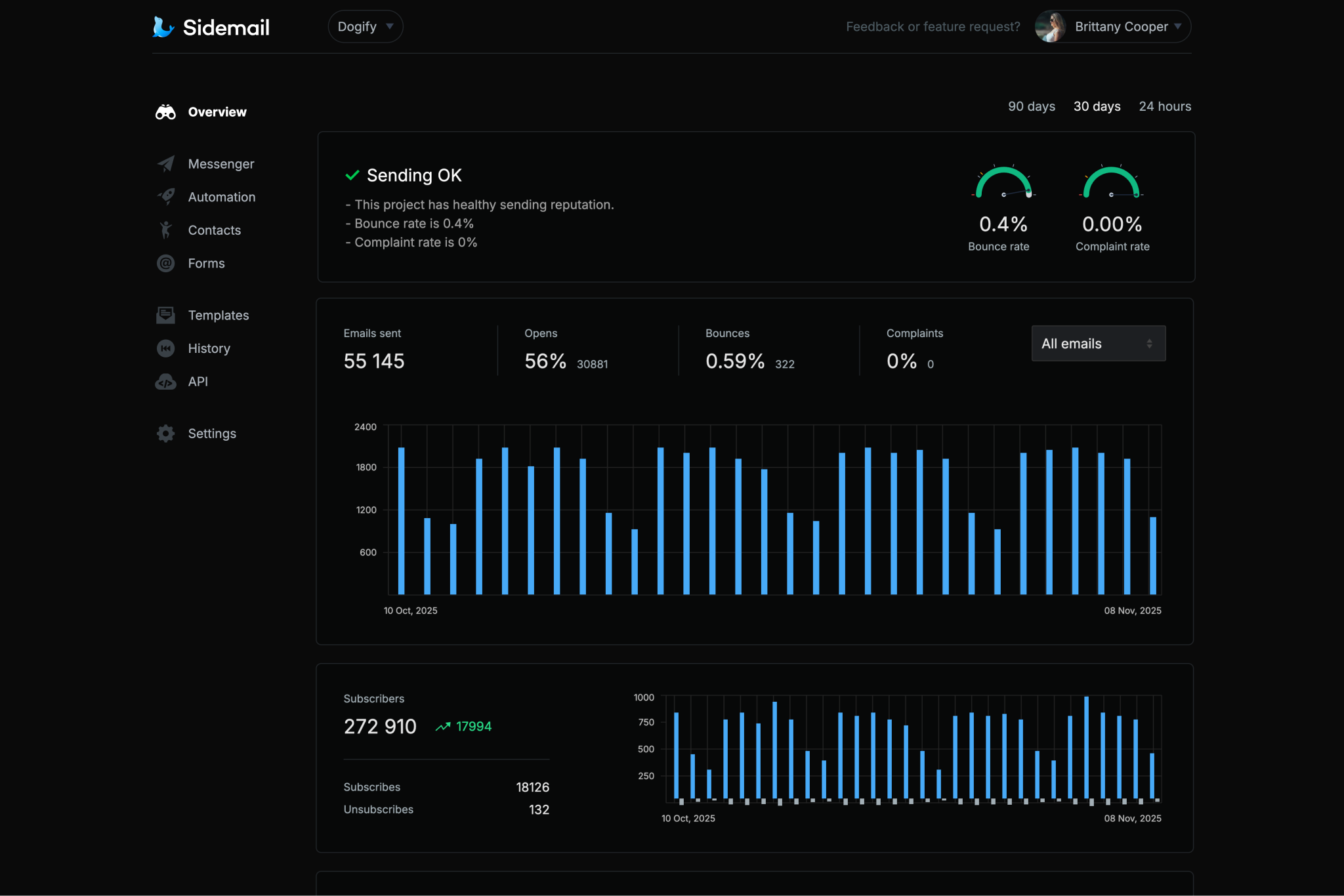
Send emails from Django views in minutes. Sidemail's Python SDK and JSON API integrate naturally with Django's architecture. Clear docs and copy‑paste examples get you sending in under 30 minutes.Reliable email delivery
Sidemail's battle‑tested infrastructure and careful sender vetting process make sure your emails land in inboxes, not spam folders. Dependable email delivery without the hassle.Custom sending domain with DKIM & SPF
Send from your own domain without the painful DNS configuration. Sidemail automatically sets up DKIM and SPF for you – two of the most critical factors for strong inbox delivery and sender reputation.All‑in‑one email platform
Sidemail covers everything in one place – transactional and marketing emails, newsletters, email automation, subscriber collection, and contact management. One platform for every email use case.Premade email templates & no‑code editor
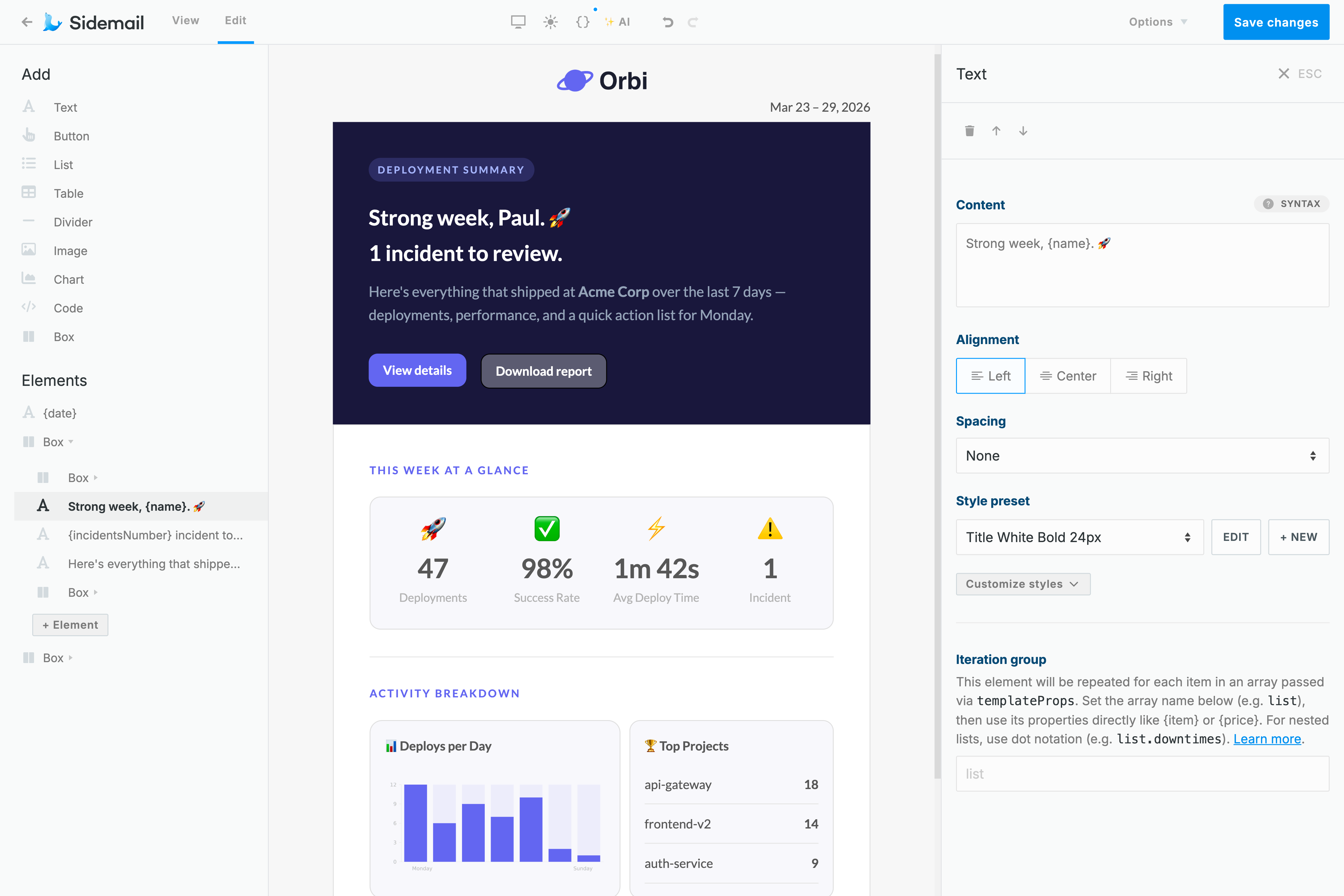
Sidemail comes with battle‑tested email templates that look great across every inbox. Need something custom? The no‑code editor lets you build responsive templates from scratch without writing any HTML or CSS.Best‑in‑class developer experience
Sidemail's email API is constructed for busy developers – clear documentation, copy‑paste code examples in multiple languages, and thoughtful features that make integration and day‑to‑day use genuinely easier.
Django transactional email examples
With Sidemail, you can send any transactional email from Django. Here are a few examples with code:
# Django: Send an account verification email
from django.http import JsonResponse
from .services import sidemail

def register(request):
    # ... create user, generate token

    sidemail.send_email(
        to_address=user.email,
        from_address="[email protected]",
        from_name="Your App",
        template_name="Email Verification",
        template_props={
            "verifyUrl": f"https://yourapp.com/verify?token={token}",
        },
    )

    return JsonResponse({"status": "registered"})
Verification email
Send a sign-up verification email with a one-time link or code to confirm the user's address.
- Include a clear call-to-action in verification emails and make the verification link expire for security.
- Sidemail includes a ready-made account activation template for this common use case.
# Django: Send a payment receipt email
from .services import sidemail
from datetime import date

sidemail.send_email(
    to_address=user.email,
    from_address="[email protected]",
    from_name="Your App",
    template_name="Payment Receipt",
    template_props={
        "userName": user.first_name,
        "amount": "$19.99",
        "date": date.today().strftime("%b %d, %Y"),
    },
)
Receipt or notification email
Send a receipt, invoice, or generic notification to your user.
- For receipts or order confirmations, include key details like the amount, date, and line items in the email.
- Sidemail offers receipt and invoice email templates. Pass dynamic data via
template_propsto populate the template.
# Django: Schedule a welcome email for 1 hour from now
from datetime import datetime, timedelta, timezone
from .services import sidemail

scheduled_time = datetime.now(timezone.utc) + timedelta(hours=1)

sidemail.send_email(
    to_address="[email protected]",
    from_address="[email protected]",
    from_name="Your App",
    template_name="Welcome",
    template_props={"firstName": "Alex"},
    scheduled_at=scheduled_time.isoformat(),
)
Welcome email with scheduled delivery
Schedule a welcome email to go out later, for example one hour after sign-up.
- Use the
scheduled_atfield with an ISO timestamp to control exactly when the email is sent. - Useful for onboarding flows where you want to delay the first message until the user has had time to explore your app.
# Django: Send a password reset email with Markdown
from pathlib import Path
from .services import sidemail

markdown = Path("templates/emails/password-reset.md").read_text()

sidemail.send_email(
    to_address="[email protected]",
    markdown=markdown,
    template_props={
        "firstName": "Alex",
        "resetLink": "https://yourapp.com/reset?token=abc123xyz",
        "expiresIn": "30 minutes",
    },
)
---
subject: "Reset your password"
fromAddress: "[email protected]"
fromName: "Your App Security"
---
Hi {firstName}, we received a request to reset your password.
[$btn Reset password]({resetLink})
This link expires in {expiresIn}.Password reset email sent with Markdown
Sidemail's API lets you write email content in Markdown, which is automatically transformed into pixel‑perfect, responsive emails that look great in every inbox and on every device. Each email is branded with your logo and styled to match your project's email design.
- Store your password reset email in a
.mdfile in your Django templates directory - Subject and sender are defined in the markdown frontmatter.
- Pass dynamic values via
template_props(such asresetLinkandexpiresIn), which map directly to variables in your markdown.
Deliverability best practices
SPF, DKIM, and DMARC for transactional email
SPF and DKIM are authentication protocols that verify your emails are legitimately sent from your domain. And DMARC builds on both by instructing mail servers how to handle messages that fail those checks. Together, they are 3 critical factors for inbox delivery and sender reputation.
Sidemail automatically handles SPF, DKIM, and DMARC setup for you, so your Django application sends properly authenticated emails from the start.
The simplest way to build emails
No‑code email editor & premade email templates
Sidemail's no‑code email editor is the easiest way to create responsive email templates that work correctly across every client and device. No HTML knowledge required. Add your logo and brand colors, and start sending.
Want to move even faster? Sidemail has a library of production‑ready templates for the most common use cases – password resets, welcome emails, receipts, and more. Build from scratch or customize a premade template — your emails are guaranteed to look great everywhere.
Learn moreDeveloper‑friendly formatting
Markdown support for Django emails
Writing and maintaining HTML emails by hand is tedious work, especially when you just want to send clean, readable content.
Sidemail lets you write your email body in Markdown and automatically converts it into a responsive, well‑styled HTML email. You get smart formatting – headings, lists, links, and code blocks – without broken layouts or cross‑client issues.
Perfect for transactional emails sent from your Django views – clean content, fast authoring, and zero HTML to manage.
Learn more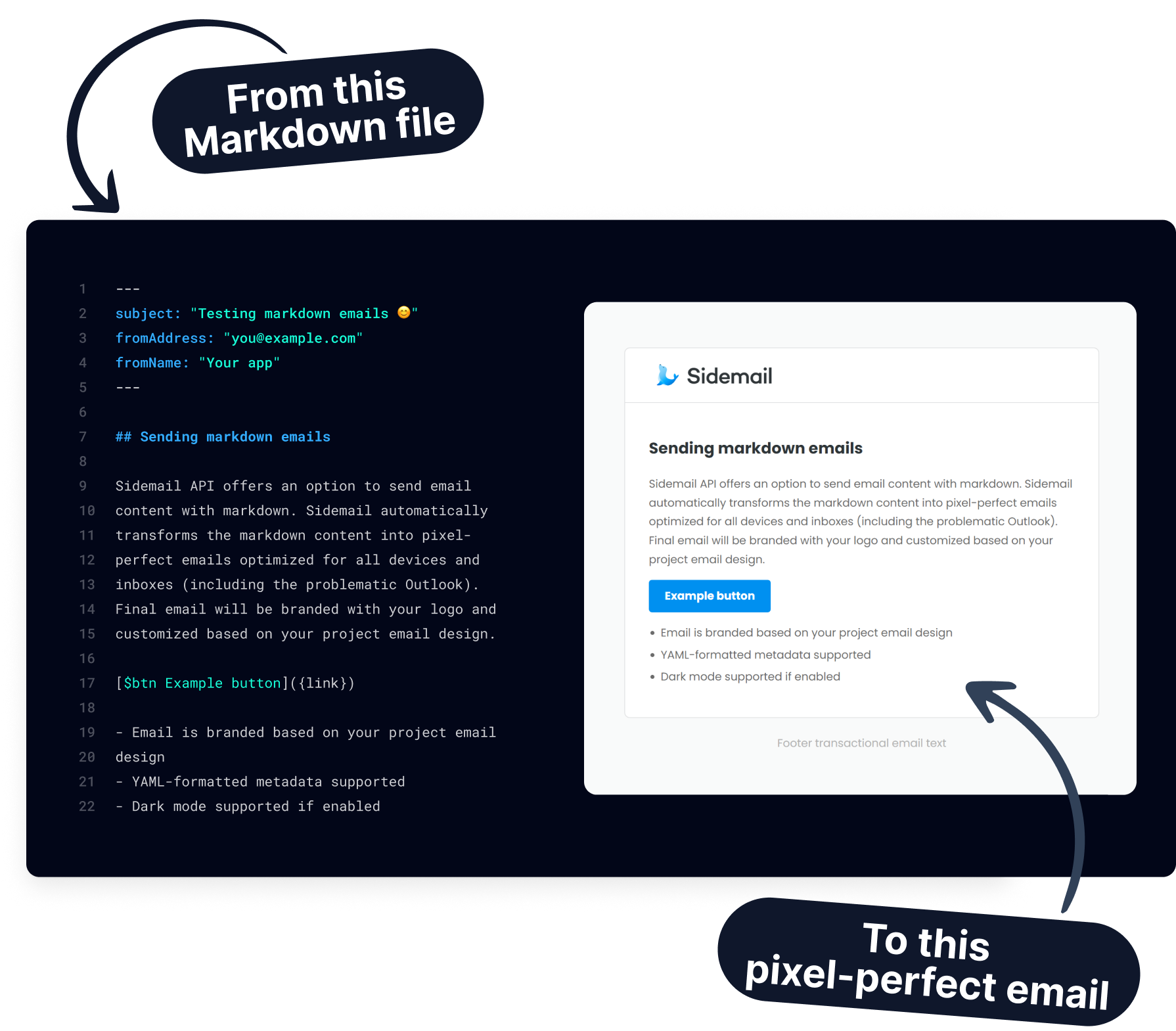
Get started today
Ready to send transactional emails from your Django app? With Sidemail's API and premade templates, you can integrate in minutes and deliver emails reliably.
Start free trialFAQs
How do I send email in Django without SMTP?
Use an email API like Sidemail instead of configuring Django's built-in SMTP backend. Install the Python SDK (pip install sidemail), create a Sidemail client instance, and call sidemail.send_email() from any view or service. No EMAIL_BACKEND or SMTP settings needed. Sidemail handles authentication, formatting, and delivery.
Does Sidemail replace Django's send_mail?
Yes. Instead of using django.core.mail.send_mail which requires an SMTP server, you call Sidemail's send_email() directly via the API. You get template support, scheduling, delivery tracking, and high deliverability out of the box – features that Django's built-in mail doesn't offer.
Can I use Sidemail with Django Signals?
Absolutely. Import the Sidemail client into your signal receiver and call send_email() when a signal fires. For example, listen to post_save on your User model and send a welcome email when a new user is created. This keeps email logic decoupled from your views.
How do I use email templates with Django and Sidemail?
In the Sidemail dashboard, pick a premade template or build one with the drag‑and‑drop editor. In your Django view, reference it by template_name and pass dynamic data via template_props. Sidemail merges the data and sends a well‑formatted email. No need to manage Django templates, CSS inlining, or HTML rendering.
Can I send emails asynchronously from Django?
Sidemail's API is fast (typically under 200ms), so synchronous calls work well for most views. If you need non-blocking delivery, call send_email() from a Celery task or Django‑Q job. Alternatively, use Sidemail's scheduled_at field to queue the email for future delivery without a task queue.
How do I handle email errors in Django?
Wrap your sidemail.send_email() call in a try/except block and catch sidemail.SidemailError. The exception includes the HTTP status code, error type, and a human-readable message. Log it with Python's logging module or Django's logger and return an appropriate response to the client.